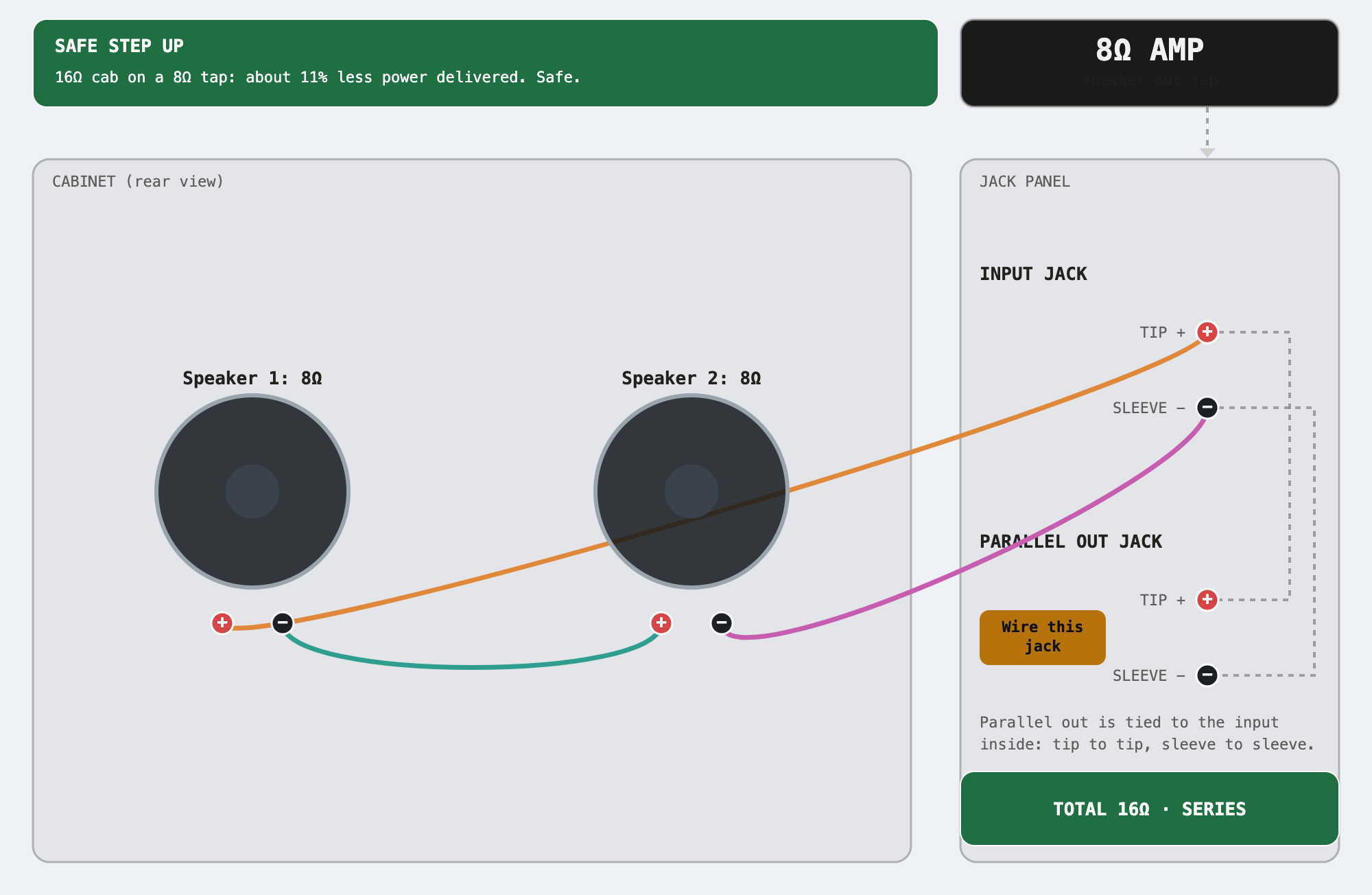
The Cab Builder answers the question that comes up every time a cab gets rewired or a new amp shows up: what impedance is this cab, and is it safe on my amp? Draw the wires between the speakers and the jack, or pick a template, and it works out the real total in ohms (Ω) and checks it against the amp's speaker-out tap.
What it does
- 1 to 8 speakers per cab, each set to 4, 8 or 16 Ω. Mixed values are allowed.
- Templates: series, parallel, series-parallel and parallel-series. One click places the wires on the right terminals.
- Any wiring works. The tool solves the actual circuit between the jack's tip (+) and sleeve (−), so a custom or half-finished layout still gives a true answer.
- Amp check: pick the amp's tap (1, 2, 4, 8 or 16 Ω) and it tells you if the cab is a match, a safe step up, or a step down you should not use.
- Warnings: a speaker wired out of phase, a speaker shorted out or left out of the circuit, a short across the jack, or no load at all.
- Two cabs: chain a second cab from the first cab's parallel-out jack and see the combined load.
The math
Series: the impedances add. Total = Z1 + Z2 + … Two 8 Ω speakers in series = 16 Ω.
Parallel: total = 1 ÷ (1/Z1 + 1/Z2 + …). With matched speakers, that is simply Z ÷ number of speakers. Two 8 Ω speakers in parallel = 4 Ω. An 8 Ω and a 16 Ω in parallel = 5.33 Ω.
Series-parallel: wire pairs in series, then the pairs in parallel. With four matched speakers the total equals one speaker's rating: four 8 Ω speakers = 8 Ω.
Common cab totals
| Speakers | Each | Series | Parallel | Series-parallel |
|---|---|---|---|---|
| 2 | 4 Ω | 8 Ω | 2 Ω | n/a |
| 2 | 8 Ω | 16 Ω | 4 Ω | n/a |
| 2 | 16 Ω | 32 Ω | 8 Ω | n/a |
| 4 | 4 Ω | 16 Ω | 1 Ω | 4 Ω |
| 4 | 8 Ω | 32 Ω | 2 Ω | 8 Ω |
| 4 | 16 Ω | 64 Ω | 4 Ω | 16 Ω |
For drawings of each layout, see the library's 2x cab wiring, 4x cab wiring and 6x cab wiring articles.
Matching the cab to the amp
The rule the tool uses everywhere: match the amp's tap, or step up. Never step down.
| Cab load vs amp tap | Verdict | Roughly |
|---|---|---|
| Equal | Match | Ideal |
| Up to 2× higher (16 Ω cab on an 8 Ω tap) | Safe step up | About 11% less power |
| 2× to 4× higher | Caution: large step up | About 11% to 36% less power, and higher voltages in the output stage. Fine at moderate volume; do not drive it hard. |
| More than 4× higher | Dangerous mismatch | Do not use |
| Lower than the tap (4 Ω cab on an 8 Ω tap) | Step down: do not use | The amp sees a heavier load than it expects. Risk of overheating and damage. |
The power figures come from a simple matching model, so treat them as a guide. Real amps vary.
How to use it
- Pick how many speakers the cab has, and set their ohms.
- Pick a template, or drag from one terminal to another to draw your own wires. Red marks + and black marks −.
- Turn on "Show an amp at the top" and pick the amp's tap.
- Read the total and the verdict, and fix any warnings before you plug in.
Things worth knowing
- Out of phase does not change the ohms. A speaker with + and − swapped still counts the same in the total, but it fights the others and the cab sounds thin and weak.
- Never run a tube amp with no load. An open circuit (nothing connected) can damage a tube amp's output transformer.
- The parallel-out jack is tied to the input inside the cab. Plugging a second cab into it puts the two cabs in parallel, which lowers the total load.